How to Turn SMS and WhatsApp Messages into Cases in Salesforce Service Cloud
If a customer has a problem, it can often be useful for them to text you about it, rather than having to spend time making a phone call, being passed to the correct department and waiting on hold.
For organisations using Salesforce Service Cloud, how do you ensure text-based conversations are managed with the same visibility, service levels and reporting as traditional support channels such as email, web forms and phone calls?
The answer is implementing Salesforce SMS to case functionality.
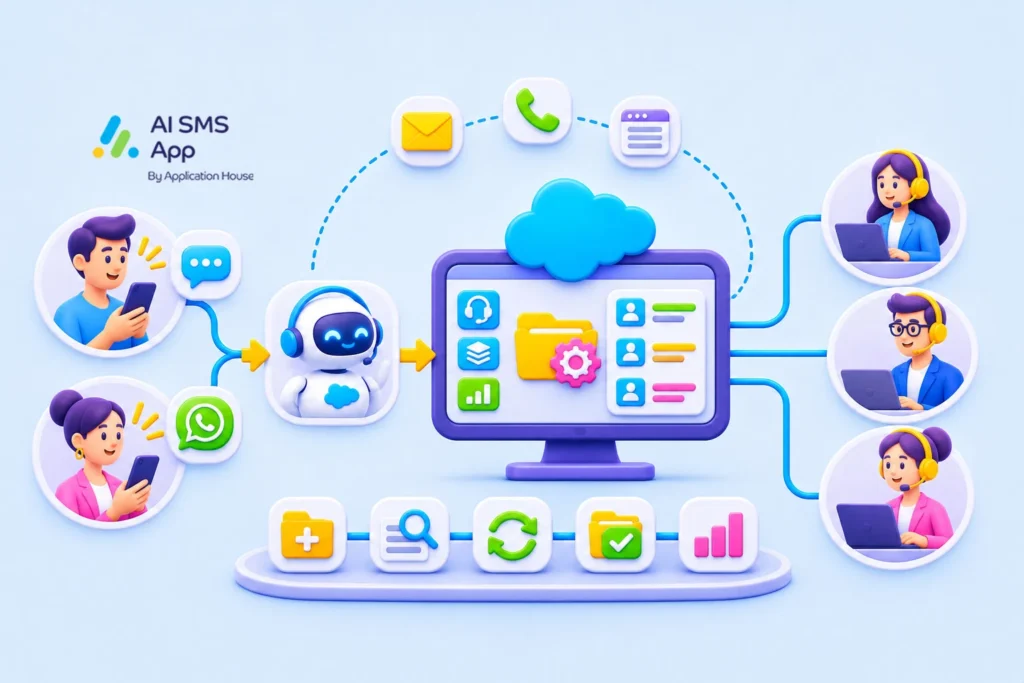
By automatically matching or creating cases from inbound SMS or WhatsApp messages, you can bring all customer service requests into a single Service Cloud workflow. This improves customer experience and gives your service and support teams complete visibility of the entire case lifecycle.
In this article, discover why you should use SMS to case in Salesforce, how to turn messages into cases and how to improve your case lifecycle.
What is Salesforce SMS to Case?
Salesforce does not include native SMS to case functionality out of the box.
To convert inbound text messages into Cases, businesses would use:
- Salesforce Digital Engagement (a Service Cloud add on) or
- A Salesforce-native SMS app from AppExchange.
These solutions allow customer messages received via SMS or WhatsApp to be automatically associated with existing records or used to create new Cases.
Why Use SMS to Case in Salesforce?
If your customers have several ways of contacting you, you ideally want to have a single queue for all customer requests – SMS and WhatsApp messages need to be in the same service operation as email, web forms and phone interactions.
That way, you can have your customer service agents all work from one queue, rather than monitoring multiple channels. This reduces missed requests and improves response speed.
SMS becomes a governed service channel, with no unmanaged conversations, and it helps you manage SMS, WhatsApp, email, and phone support through a single Service Cloud process.
How To Turn SMS and WhatsApp Messages Into Salesforce Cases
One of the most cost-effective ways to turn messages into Salesforce cases is by using an SMS add-on app.
Not all apps will allow this functionality, but here’s why AI SMS app is a great option:
- You can configure how inbound messages are handled for each phone number, choosing whether messages should:
- Match existing Cases
- Create new Cases
- Match OR create Cases which will look up to see if there is an existing open case from the number that has text. If not, it will create a new case.
- Agents can view complete SMS and WhatsApp conversations directly within the Case record, ensuring all communication remains linked to the customer’s support journey.
- The application also includes a central messaging inbox, allowing teams to review inbound messages, including enquiries received outside normal operating hours.
How Salesforce SMS-to-Case Improves the Entire Case Lifecycle
A typical support case moves through several stages, and SMS or WhatsApp messaging can support agents and customers at each stage.
1. Case creation
All support journeys start when a customer reaches out. Instead of calling up or emailing, a customer might choose to send a text.
With AI SMS App, inbound SMS and WhatsApp messages can be configured to match an existing case, create a new case or match OR create a case.
For many organisations, match OR create is the most effective option. When an inbound message arrives, Salesforce searches for an existing open case associated with that phone number. If a case already exists, the message is attached to the existing case. If no matching case exists, a new case is automatically created.
This prevents duplicate records while ensuring every customer enquiry enters a managed support process.
Without SMS to case functionality, customer text message conversations remain inside separate inboxes or messaging platforms, which can lead to missed enquiries, duplicate responses, lack of ownership, and poor customer experience.In Salesforce, SMS to case creation means every message becomes actionable.
2. Case Assignment
Once a case exists, Salesforce can automatically route it to the right team. The issue can be categorised, the priority established and the case routed to the appropriate team or agent.
SMS-generated cases use the same Salesforce workflows as other channels, so agents can work from a single queue of customers instead of monitoring separate communication platforms.
3. Managing ongoing SMS conversations
Most support issues aren’t resolved in a single message – both the customer and customer service agents might have questions, and more than one agent may deal with the case. When conversations are matched directly to Salesforce cases;
- every message is stored against the Case
- every agent sees the same conversation history
- escalations become easier
With AI SMS App, your customer service agents can see a full one-to-one conversation inside the Case record. This resolves a big customer service frustration – having to repeatedly explain their situation or problem.
4. SLA Management and Entitlements
This is one of the most powerful reasons to use SMS and WhatsApp messages for Salesforce cases.
Without a case record, messages are simply a text conversation. Once a message is converted into a Case, Salesforce can apply SLA’s, entitlements, milestones, escalation rules and priority management – whatever your service commitments are.
5. Resolution and Case closure
Once a case is resolved, it can be closed but will retain the full communication history.
With all messages attached to the Salesforce record, you can review the whole interaction later. This can be beneficial for audit trails, compliance records, internal knowledge sharing, and future customer support references.
6. Reporting and continuous improvement
If SMS and WhatsApp conversations are dealt with outside of Salesforce, reporting will be limited. Once an SMS becomes a Case, you can use the powerful Service Cloud analytics to report on them. You’ll be able to see things like:
- How many cases originate from SMS?
- How many cases originate from WhatsApp?
- What team is receiving the most support enquiries?
- Are SLA targets being met?
- What is the average resolution time?
These insights let you plan the workforce appropriately and improve your service offering and processes.
Start Using Salesforce SMS to Case to Improve Your Customer Service
For many customers, messaging is now preferred over calling. Customers can send a message whenever it suits them, and respond when it’s convenient, without needing to remain connected to a phone call.
It is challenging to keep text conversations connected to existing support processes, so it’s valuable to bring SMS and WhatsApp conversations into the complete Service Cloud case lifecycle.
By automatically matching or creating Cases from inbound SMS and WhatsApp messages, you can offer customers the convenience of messaging while maintaining the visibility, accountability, and service standards your customers expect.
If you are looking to improve response times, reduce the number of missed enquiries, and create an omni-channel customer support experience, SMS to case is an essential part of your Salesforce Service Cloud.
A note on Salesforce Service Cloud SMS
While inbound messages are important, you should also consider the value of being able to send SMS from Salesforce Service Cloud so that Customer Service agents can:
- Reply directly from Case records
- Provide status updates
- Follow up on open Cases
- Request additional information
This keeps all customer communications within Salesforce and ensures a complete service history is maintained.
To send SMS or WhatsApp messages from Salesforce Service cloud you need the expensive add-on, Salesforce Digital Engagement, or an App such as AI SMS App from AppExchange.